Total Pageviews

SQL Server : Replicate ()


While working I was looking for a function which can help me to repeat a particular ‘string’ up to ‘n’ number of times and I can dynamically provide the value of ‘n’ and ‘string expression’ to that function as well.

Replicate() fulfills both requirement.

Replicate help us to repeat a string N number of times.


  1. Example:-

    SELECT
     REPLICATE ('*',10) Result_Set

    Result_Set
    **********

  2. Example:-

    DECLARE @v VARCHAR(10) = '*'
    DECLARE @v1 INT = 4
    SELECT REPLICATE (@v,@v1) Result_Set
    Result_Set
    ****


How to know data type of a column


With the help of below query, we can get the data type of a column:-

SELECT TABLE_NAME
, COLUMN_NAME
, DATA_TYPE
, CHARACTER_MAXIMUM_LENGTH 
FROM INFORMATION_SCHEMA.COLUMNS
WHERE COLUMN_NAME LIKE '%<Column Name>%'

follow over facebook @ "SQL-Horizons"

List of stored procedures depend on a table


There is a Dynamic Management Function introduced with SQL Server 2008 which help us to get the list of stored procedures depend on a table.

Below is the query:-

SELECT referencing_schema_name
, referencing_entity_name 'StoredProcedureName'
, referencing_class_desc
FROM sys.dm_sql_referencing_entities('<schema>.<TableName>','OBJECT')

Note:- While specifying the table name please include schema name also, otherwise result will not display the dependent stored procedure.

Example:-

Create table

CREATE TABLE tbl (id INT)
GO

Create Stored Procedure which refer table "tbl"

CREATE PROC dbo.proc_test
AS
BEGIN
 
SELECT *
FROM tbl1

END 
GO

Lets create one another stored procedure which refer table "tbl"

CREATE PROC dbo.proc_test2
AS
BEGIN
 
INSERT INTO tbl VALUES (1)

END 
GO

Now time to figure out name of stored procedures depend on table "tbl" with the help of below query:-

SELECT referencing_schema_name
, referencing_entity_name 'StoredProcedureName'
, referencing_class_desc
FROM sys.dm_sql_referencing_entities('dbo.tbl','OBJECT')

Result of above query

referencing_schema_name StoredProcedureName referencing_class_desc
dbo                                          proc_test                         OBJECT_OR_COLUMN
dbo                                          proc_test2                 OBJECT_OR_COLUMN


follow over facebook @ "SQL-Horizons"

List of tables referenced by stored procedure


There is a Dynamic Management Function introduced with SQL Server 2008 which help us to get the list of tables referenced by a stored procedure.

Below is the query:-

SELECT referenced_schema_name
, referenced_entity_name 'TableName'
, referenced_minor_name 'ColumnName'
, referenced_id
, referenced_class_desc
FROM sys.dm_sql_referenced_entities ('<Schema>.<StoredProcedure>','OBJECT')

Note:- While specifying the stored procedure name please include schema name also, otherwise result will not display the dependencies.

Example:-

Create table 1

CREATE TABLE tbl1 (id INT)
GO

Create table 2

CREATE TABLE tbl2 (id INT)
GO

Create Stored Procedure which refer tbl1 & tbl2

CREATE PROC dbo.proc_test
AS
BEGIN

SELECT *
FROM tbl1 a
INNER JOIN tbl2 b
ON a.id = b.id

END
GO

Now time to figure out tables referenced by the stored procedure "proc_test" with the help of below query:-

SELECT referenced_entity_name 'TableName'
, referenced_minor_name 'ColumnName'
, referenced_class_desc
FROM sys.dm_sql_referenced_entities ('dbo.proc_test','OBJECT')

Result of above query

TableName ColumnName referenced_class_desc
tbl1         id OBJECT_OR_COLUMN
tbl2         id OBJECT_OR_COLUMN


follow over facebook @ "SQL-Horizons"


PRINT in SQL Server


  • Returns a user-defined message to the client. 
  • Message should have string ((n)varchar) data type.
  • If we are planning to PRINT any variable value and that variable is not of string data type then only after converting it to string data type, we can print that.
  • A message string can be up to 8,000 characters long if it is a non-Unicode string, and 4,000 characters long if it is a Unicode string.
  • Print also help us in debugging.
For example:-

a) PRINT a user defined message :-


b) PRINT Variable value having string data type:-


c) PRINT variable value not having string data type:-


TOP n PERCENT

TOP n [PERCENT]

With the help of this we can limit the result set.

In the case of TOP, by default it will return the n number of rows of total result set but if we use PERCENT with TOP then it will return the n PERCENT record of total result set.

PERCENT is optional with TOP.

For example:-


Statistics in SQL Server


Statistics determine the selectivity of the indexes. If an indexed column has unique values then the selectivity of that index is more, as opposed to an index with non-unique values. Query optimizer uses these indexes in determining whether to choose an index or not while executing a query.

Error Function

Below are some error functions, which help us in debugging:-

Function Name
Description
ERROR_MESSAGE()
Returns the complete description of the error message
ERROR_NUMBER()
Returns the number of the error
ERROR_SEVERITY()
Returns the number of the Severity
ERROR_STATE()
Returns the error state number
ERROR_PROCEDURE()
Returns the name of the stored procedure where the error occurred
ERROR_LINE()
Returns the line number that caused the error


FacebookPage

@@TranCount


It returns the number of active transaction in current connection.

When transaction within a transaction starts, it increase @@TranCount by 1. COMMIT and ROLLBACK decrease @@TranCount by 1 except for ROLLBACK TRANSACTION <savepoint_name>, which does not affect @@TRANCOUNT.


 - facebook_page


@@TranCount and XACT_STATE()

Difference between @@TranCount and Xact_State() :-

Both @@TranCount and Xact_State() are use to get the information about transaction in SQL Server.

The major difference between @@TranCount and Xact_State() is, @@TRANCOUNT does not report uncommittable transactions and XACT_STATE() does not report the transaction nesting level.

Existence of Constraint


With the help of below code, we can find out that particular constraint exist or not on a table. Its always good practice to check the existence of constraint in constraint creation script.

SELECT *
FROM sys.objects
WHERE parent_object_id = OBJECT_ID('<table name>')
AND name = '<constraint name>'


UNION ALL

 
This operator combines the result set of multiple queries or you can say it appends the result set of next query to the previous query result set.
Some points need to consider:-
  • Number of columns in all result set or in all queries must be same.
  • Order of columns must be same in all queries.
  • Data type of columns must be same.
  • It returns the unsorted result set.
  • It returns all records whether its duplicate record or not.
 Below is the example:-


Index Created Date


With the help of below query, we can figure out the index created date:


SELECT si.name 'Index Name'
, so.crdate 'Index Created Date'
, OBJECT_NAME(so.id) 'Object Name'
FROM sysindexes si
INNER JOIN sysobjects so
ON so.id = si.id
ORDER BY crdate DESC

CASE Statement


We can use CASE statement in two formats:-

  • Simple CASE statement, where CASE expression compares the given conditional value to determine the result.
  • Search CASE statement, where CASE expression evaluates a set of Boolean expressions to determine the result

Some important points:-

  • CASE statement supports optional ELSE argument.
  • In the case of not supplying ELSE argument, NULL will be taken as default value for ELSE.
  • CASE can be used in any statement like SELECT, UPDATE, DELETE, SET and in clauses like SELECT_LIST IN, WHERE, ORDER BY, HAVING.
  • SQL Server allows for only 10 levels of nesting in CASE expressions.
  • The CASE expression cannot be used to control the flow of execution of Transact-SQL statements, statement blocks, user-defined functions, and stored procedures.
Below is the example:-


Cross Join


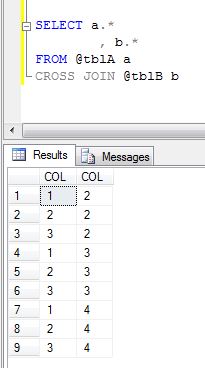
By default, Cross Join returns Cartesian product OR we can say, Cross Join returns N*N result set.

Lets have an example as below:-


Now Cross Join both @tblA and @tblB :-


After apply filter criteria to Cross Join, we will get result set accordingly.


Full Outer Join


This logical operator returns all the records from any one of the table and non-matching records from the another tables which will be based on the joining condition.

Or, we can say

Non matching records from one table + matching records of both table + non matching records from another table
 
Example
 

Lets have data as below :-


Now use Full Outer Join (we can use as Full Join also) and have a look at returned result set as below :-


Right Outer Join


This logical operator returns all the records from right hand side table and similar records from left hand side table.

Example

Lets have data as below :-


Now use Right Outer Join (we can use as Right Join also) and have a look at returned result set as below :-


Facebook page


Left Outer Join


This logical operator returns all the records from left hand side table and similar records from right hand side table.

Example: Lets have data as below :-


Now use Left Outer Join (we can use as Left Join also) and have a look at returned result set as below :-


Outer Join


In the case of Outer Join, SQL Server returns all the data from at least one table and matching records from the another table based on the column being used in Join condition.

We have below type of Outer Join :-


Inner Join


Inner join logical operator returns those records from more than one tables which have the exact value in the column which is being used in joining condition.
Preferably the join is based on referential integrity enforcing the relationship between the tables to ensure data integrity.

Example:-


If we have duplicate records then inner join behaves like cross join for those duplicate records.

Example:-